Administration
Invites, roles, suspending people, and reading the instance counts
The admin panel is at /admin/ on the same address, built into the same binary. Administering an instance means four things: deciding who gets in, deciding what they may do, watching what is stored, and stepping in when something is wrong. Each one is a permission.
With features.admin off, every route here answers 404
Not 403. A switched-off feature is one the instance does not have, so the answer is the same one an unknown path gets.
Permissions and roles
A permission is a resource:verb string. Ones that reach beyond the holder's own things are marked privileged.
| Permission | Reaches |
|---|---|
shares:create, shares:read, shares:delete | Your own shares |
tokens:manage | Your own API tokens |
shares:read:any, shares:delete:any | Every share on the instance |
users:read, users:write, users:delete | Accounts |
invites:read, invites:create, invites:delete | Invite codes |
roles:read, roles:write | Roles and who holds them |
stats:read | The instance counts |
Four roles ship with the instance: owner holds everything, admin holds everything except users:delete, shares:delete:any and roles:write, member holds the four self-service permissions, and guest holds none.
guest is there for an instance that wants people to sign in and then wait for somebody to move them. Point auth.default_role at it and a new account can do nothing until it is given a role.
Making your own
A role is a name, a description, a list of permissions, and two limits: how much its holders may store in total, and how large one file may be. You can create your own, change what one allows, and remove it.
The built-in roles cannot be edited or removed
Changing their permissions answers 409 with a message pointing at auth.default_role. Make a role of your own and register new accounts into that instead.
An account is in exactly one role. Assigning a new one replaces what it had.
The built-in four are nested: guest can do nothing, member can do what admin can minus the administrative parts, and owner can do everything admin can and more. That is why one is enough.
Invite codes
Only consulted when auth.registration is invite. On open they are ignored, on closed nobody registers at all.
A code has a number of uses, an optional expiry, and a note so a list of them means something. Without an expiry it lasts until it is used up or revoked. Registering without a code on an invite-only instance is refused with a message saying one is needed.
The code comes back once
The code itself is not kept, only a fingerprint to check it against. One nobody wrote down has to be revoked and replaced.
The list shows how many of each code's uses are spent and whether it still works. Revoking one does nothing to the accounts it already created.
tessera-server invite mints one from the command line. -n is the number of uses, 1 by default; -d the days until it expires, never when left out; --note the note. The code is printed once.
tessera-server invite -n 5 -d 7 --note "book club"Accounts
An account can be suspended and let back in again.
- Suspended stops the person signing in. Their shares keep serving, because whoever holds one of those links did nothing wrong.
- To stop the content too, disable the shares themselves.
Two-step verification can be turned off for somebody who has lost their authenticator. The user list shows who has it on.
Removing an account scrubs its record but does not touch what it uploaded. Ending somebody's shares is a separate action, and it reports how many it ended. See where your data lives for what survives either way.
You cannot remove the last administrator
Deleting, demoting, or taking the role-editing permission off the only account that holds it is refused. That includes doing it to yourself.
Shares
Every share on the instance can be listed, newest first, with who uploaded it, how much it has sent, and, when it was disabled, why: an administrator, or a scanner naming what it found. Any of them can be removed.
shares:delete:any is the only way to reach a share whose uploader is gone, because ordinary deletion checks ownership and a removed account owns nothing.
Settings
Every setting can be listed with the value in force and which layer supplied it. The ones that can only come from the environment say so rather than failing quietly when you try.
A change that throws something away is refused until it is confirmed, and you can ask what it would destroy before deciding.
See configuration for which settings can only come from the environment.
The access log
share.access_log.enabled is off. Turn it on and every handover of content is recorded, readable per share by anyone holding shares:read:any.
Uploaders cannot read it.
See where your data lives for what a row holds and how long it stays.
Storage backends
Places to put files are managed here: add one, remove one, and choose which takes new uploads. Each carries a name, an address, an optional capacity, a read-only switch, and whether browsers may go to it directly.
Each also shows whether it answered the last time it was called, and why not. Uploads and downloads keep that current; an idle backend is checked every fifteen minutes and a failing one every five. A backend that stops answering looks fine otherwise, while the shares held there fail.
An address is sealed before it is stored and never read back, because it holds a credential and a list of backends is the kind of thing that gets pasted into a help thread.
See where files are kept for how a file picks one.
The instance's name and look
The title and description shown on the front page and in link previews are set here, and so is the instance's default language.
Link previews are written in that language, since a chat app fetching a link says nothing about who will read it. The site opens in it for a visitor whose browser asks for none of English, Japanese, Traditional Chinese and Simplified Chinese. It is English until you change it.
Changing it later only reaches new visitors. The first visit stores the visitor's language in a cookie, and the cookie wins from then on.
So is the default look: light, dark or following the system, a theme and an accent colour. Each person can pick their own in their settings; the default is what everybody else sees.
Speed test
Off by default. speed.enabled adds a page that measures the line between a visitor and the instance, by sending and receiving throwaway data that never touches the disk.
| Setting | Default | |
|---|---|---|
speed.enabled | off | |
speed.anonymous | off | Only signed-in people may run it |
speed.max_bytes | 25 MiB | The most one run sends or receives |
Each source may run it five times an hour, uploads and downloads counted together. With it off, or off for anonymous visitors, it does not exist as far as they can tell.
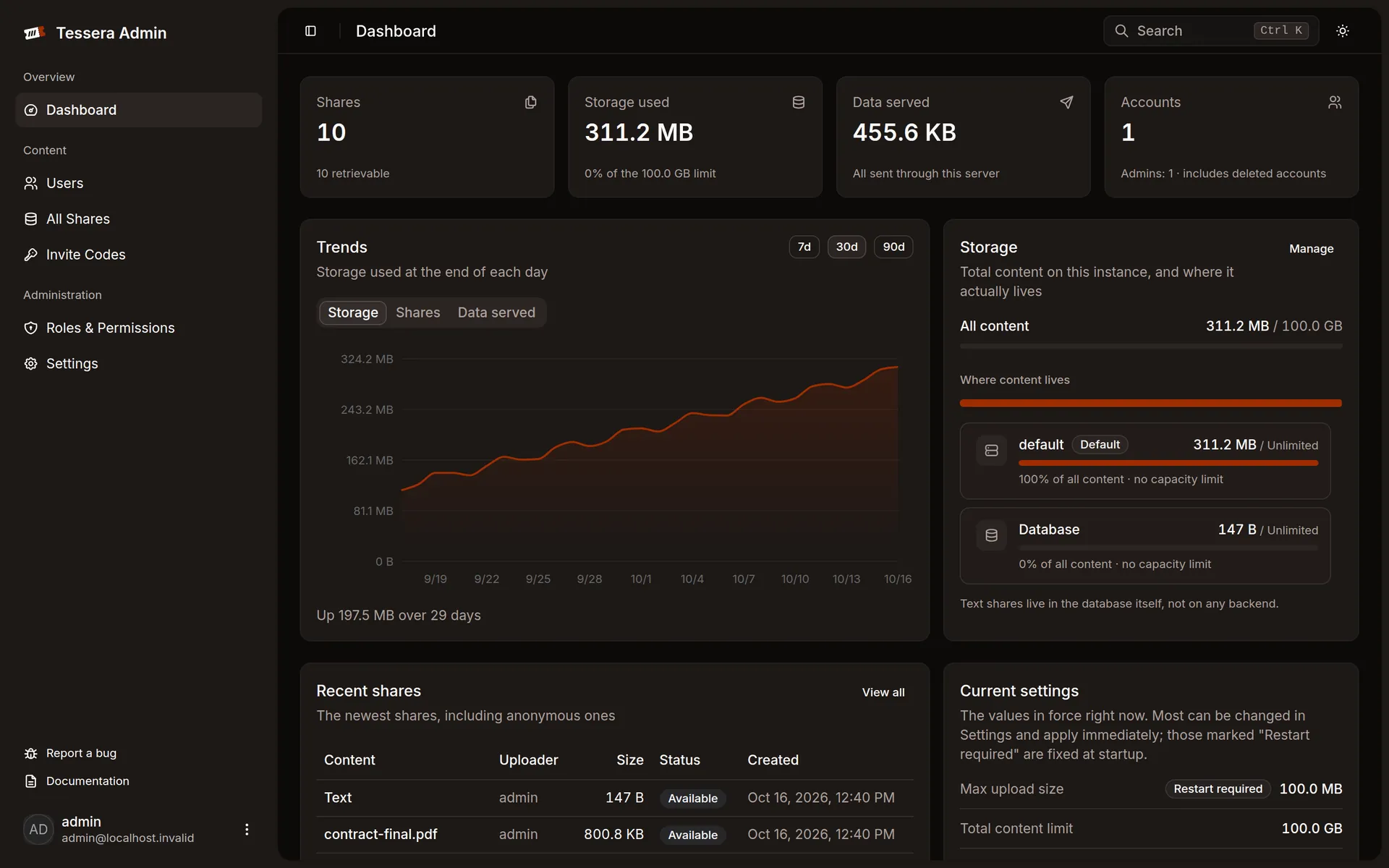
Instance counts
The instance reports:
| Field | What it is |
|---|---|
accounts, administrators | How many exist, and how many administer |
shares vs live_shares | Everything held, against what a visitor could still open |
stored_bytes | Uploaded content still on the store |
quota_bytes | The ceiling from storage.max_total_bytes, null when unset |
live_invites | Codes that could still admit somebody |
bytes_served | How much this server has sent |
bytes_redirected | How much browsers were sent to fetch straight from a bucket |
A snapshot of stored_bytes, shares, live_shares and bytes_served is kept once a day for a year, so the panel can show how storage has changed. A day the server was off has no snapshot rather than a zero, and history starts from the version that introduced it.
A large gap between shares and live_shares means the sweep has not caught up, or retention is longer than you thought.
quota_bytes null means nobody said
On an instance that takes anonymous uploads, that is the combination the start-up warning is about. See configuration.